We’d love your feedback! Only 3 short questions and 5 min of your time. Take the short survey →

Hospitality Communication

Hotel staff alerts and internal communication that keep teams aligned and guests happy

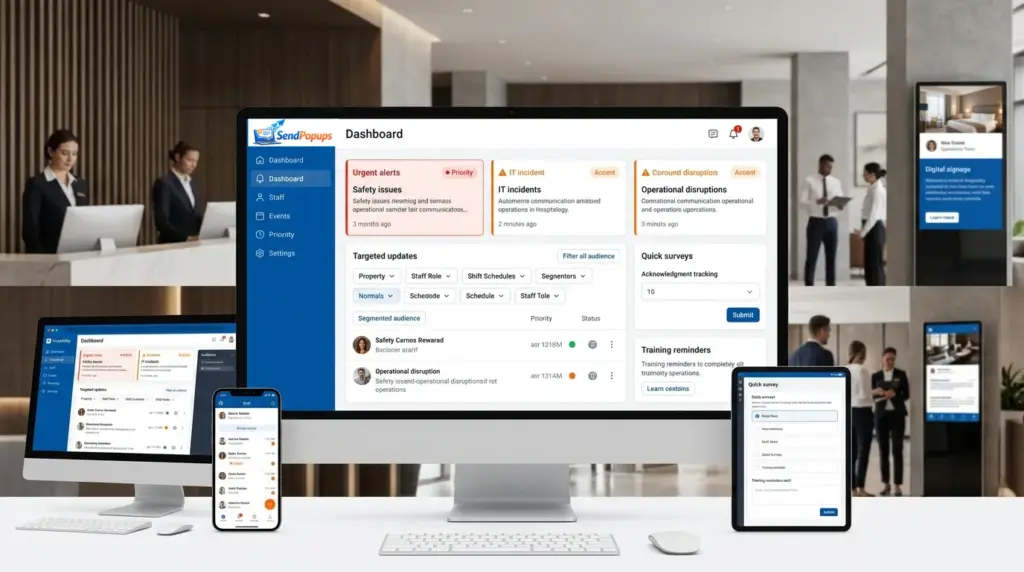
Use SendPopups to reach hotel, resort, and hospitality teams across shifts, properties, departments, and devices with high-visibility alerts, mobile messaging, acknowledgments, and multilingual updates.

Built for visible communication across hospitality operations
HotelsResortsHospitality GroupsMulti-Property OperationsFrontline TeamsBack-of-House Staff

Better internal communication leads to better guest experiences

Why it matters

Higher guest satisfaction starts with better-informed teams

When staff receive timely, visible updates and stay connected to company priorities, service quality improves, coordination gets smoother, and guests experience fewer gaps.

The challenge

Traditional channels often miss frontline hospitality staff

Email and meetings alone are rarely enough for hotel operations. Many employees are not at desks, work rotating shifts, or move constantly through the property, so messages can easily be delayed or missed.

Make hospitality communication faster, more targeted, and more engaging

SendPopups helps you deliver important information to employees across locations and languages, target messages to the right teams, and track whether critical updates were seen and acknowledged.

For hotel groups, resorts, and regional operations, use one communication layer to keep multiple properties aligned without relying on inbox checks or shift handovers alone.

Outcome 01

Faster internal updates

Push important messages instantly to staff instead of waiting for shift meetings or email open rates.

Outcome 02

More relevant targeting

Send messages by property, department, role, location, shift, or emergency-response group.

Outcome 03

Stronger accountability

Use acknowledgments, surveys, RSVP, and follow-up reminders to confirm that people saw what matters.

How SendPopups improves employee communication in hospitality

Keep hotel staff informed on time, gather feedback quickly, and reduce unnecessary interruption by choosing the right channel for the urgency and audience.

Use Case 01

Keep guests and staff safe

  • Promote safety instructions through desktop alerts, mobile messages, and signage.
  • Prepare emergency templates for faster response.
  • Reinforce procedures with training, quizzes, and rich media content.
Use Case 02

Send IT alerts on time

  • Notify staff about planned or unplanned outages instantly.
  • Duplicate desktop notices with mobile alerts for non-desk employees.
  • Track who saw the warning and follow up when needed.
Use Case 03

Make HR announcements

  • Request acknowledgments for policy or process changes.
  • Run quick surveys for employee input.
  • Target updates to new hires, managers, or specific teams.
Use Case 04

Support training and onboarding

  • Schedule onboarding messages in advance.
  • Invite staff to training and collect RSVP responses.
  • Check knowledge and compliance with quizzes.
Use Case 05

Reach every employee

  • Use desktop, mobile, and signage together to reach staff wherever they are.
  • Share messages with video, images, links, files, and other engaging formats.
  • Reduce dependence on email for urgent operational communication.
Use Case 06

Empower hotel marketing and service teams

  • Make sure frontline staff know current offers, campaigns, and promotions.
  • Support more consistent guest messaging across departments.
  • Use visible channels to keep important commercial updates top of mind.

See whether SendPopups fits the communication needs of your hospitality business

Reduce information delays, improve staff visibility, and keep the right people informed with one-click alerts, scheduled campaigns, and targeted internal communication.

Hospitality communication tools by channel

Channel 01

Computer

Reach employees working at desks or shared terminals with visible desktop communication.

  • Pop-up alerts
  • Scrolling tickers
  • Screensavers
  • Wallpapers and lock screens
  • Surveys, quizzes, and emails
Channel 02

Mobile

Deliver communication to frontline staff, shift workers, and employees moving around the property.

  • Mobile app alerts
  • SMS fallback
  • Surveys and quizzes
  • Remote communication for off-desk teams
Channel 03

Digital signage

Use lobby screens, back-of-house displays, staff areas, and shared monitors for visual communication to employees or guests.

  • Operational notices
  • Safety reminders
  • Campaign and awareness messaging

Key hospitality communication features

Feature 01

Multi-language

Send messages in the right language for local teams and properties.

Feature 02

One-click alerting

Trigger urgent notifications in seconds when time matters.

Feature 03

Acknowledgments

Capture proof that staff read and understood policies, procedures, and important updates.

Feature 04

Schedule in advance

Plan campaigns, onboarding steps, reminders, and routine announcements ahead of time.

Feature 05

Notification templates

Save reusable message formats for emergencies, outages, HR notices, and operational updates.

Feature 06

Targeting

Deliver communications only to the properties, shifts, roles, teams, or individuals who need them.

Benefits for hotel, resort, and hospitality teams

Benefit 01

Fewer delays in informing staff

Deliver important information faster than email-only communication and reduce missed updates across shifts.

Benefit 02

Higher employee engagement and performance

Use more visible channels and interactive formats to keep teams aligned with daily priorities.

Benefit 03

Better business resilience during emergencies

Support continuity when incidents, outages, or urgent safety events require fast communication.

Benefit 04

Higher guest satisfaction

Give employees the information they need to respond consistently and confidently to guests.

Benefit 05

Flexible for hospitality workflows

Adapt campaigns, templates, and targeting to different property types, departments, and communication needs.

Frequently asked questions

What is a hospitality staff communication app?

It is a communication system used to inform hotel and hospitality employees about important updates, operational changes, safety instructions, training, and internal campaigns through visible channels such as desktop alerts, mobile notifications, signage, email, and SMS.

Why is email alone not enough for hotel communication?

Many hospitality employees are frontline workers who are not constantly at desks, do not check inboxes frequently, and work in rotating shifts. Visible, targeted alerts help close that communication gap.

Can SendPopups help with emergency communication?

Yes. You can prepare templates, trigger urgent alerts quickly, target the right groups, and request acknowledgments for critical messages.

Can messages be targeted by property, shift, or department?

Yes. SendPopups can be used to target employees by location, team, role, or other operational groups so people receive only what is relevant to them.

How can HR teams use SendPopups in hospitality?

HR can use it for onboarding, policy updates, reading confirmations, pulse surveys, training invitations, and reminders for specific employee groups.

Can signage be used alongside desktop and mobile alerts?

Yes. Digital signage can reinforce internal messages visually across staff areas, shared screens, and operational spaces while desktop and mobile channels handle targeted delivery.

Build a more responsive hospitality communication workflow with SendPopups