








We’d love your feedback! Only 3 short questions and 5 min of your time. Take the short survey →

Corporate Wallpaper

Corporate Desktop Wallpaper for Visible Internal Communication

Turn everyday desktop backgrounds into a subtle but effective communication channel with SendPopups corporate wallpaper. Promote company values, upcoming events, compliance reminders, IT notices, safety messages, and internal campaigns without interrupting work.

Wallpaper-based communication keeps important messages visible at the start and end of the workday while preserving a clean employee experience.

Visual Placeholder

Replace this area with a SendPopups wallpaper mockup, desktop background example, or admin dashboard screenshot.

  • Branded desktop wallpaper with messaging zones
  • Compliance or values campaign creative
  • Wallpaper targeting and scheduling dashboard
  • Multi-department wallpaper examples

What Is Corporate Wallpaper?

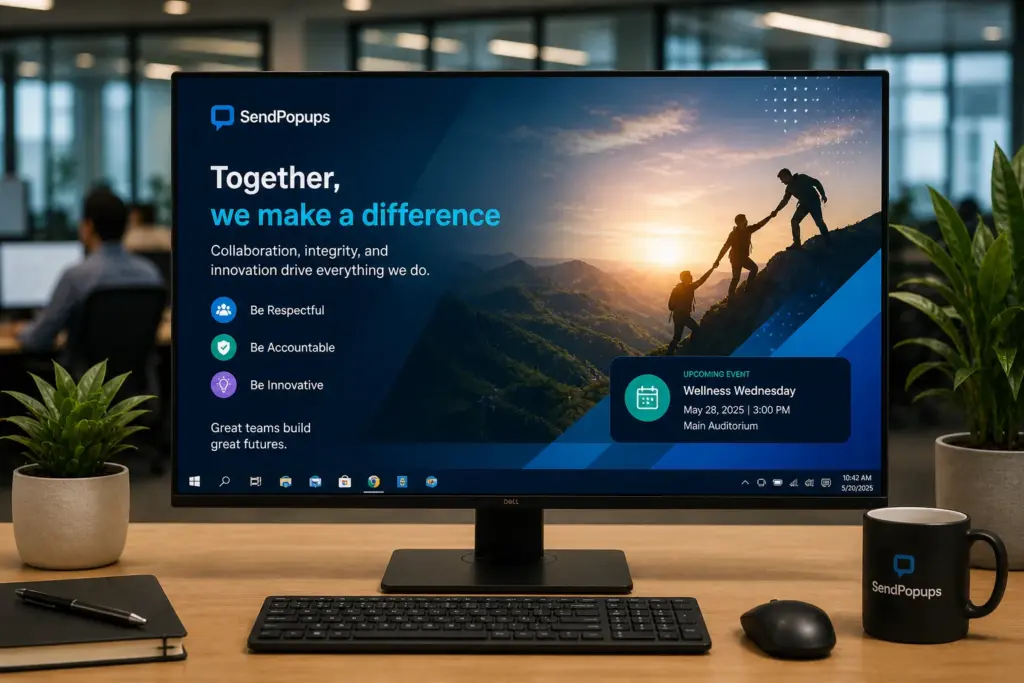
Corporate wallpaper is the image displayed on the background of employee desktops. With SendPopups, it becomes a subtle internal communication surface for messaging that employees naturally see when they begin or end their workday.

Trusted by Teams That Need Better Message Visibility

Use this section for customer logos, proof points, and client trust indicators after import.

Healthcare

Visible policy and safety messaging

Education

Campus and staff communication

Manufacturing

Shift and site-based updates

Enterprise

Cross-site internal campaigns

Set the Corporate Background of Employees’ PCs

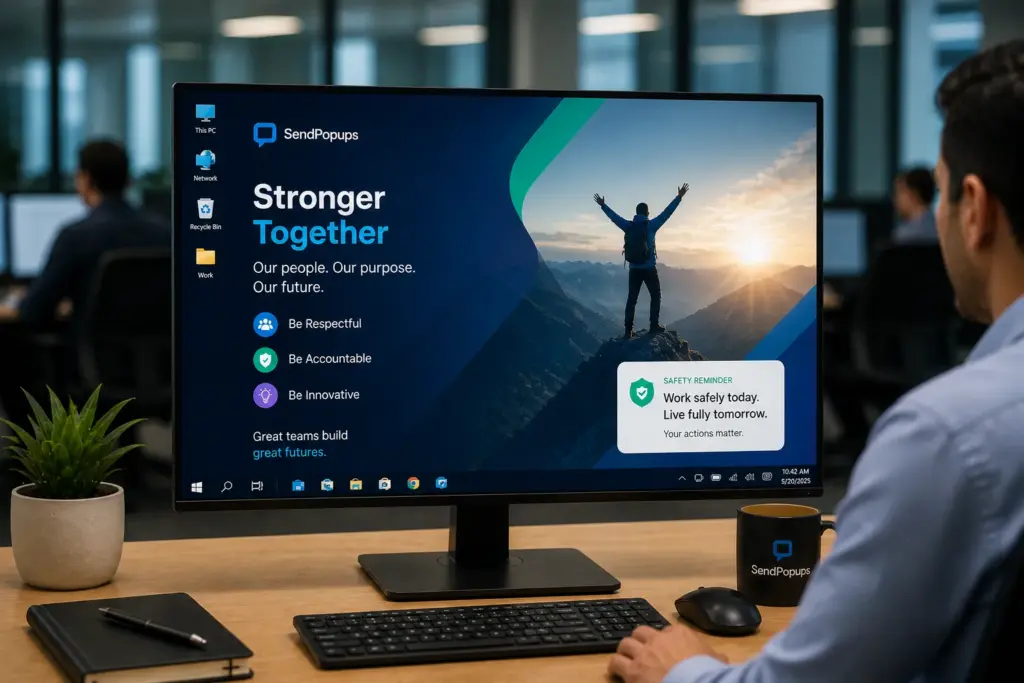
Turn the default wallpaper on employee workstations into a branded internal communication channel. SendPopups can be positioned to deliver desktop backgrounds that reinforce campaigns, reminders, and company-wide messaging without disrupting daily work.

Because wallpaper only sits behind applications, it stays unobtrusive while still remaining visible at the right moments.

Visual Placeholder

Replace with a wallpaper preview showing branded messaging behind desktop icons and shortcuts.

Target, Customize, and Control Your Corporate Wallpaper

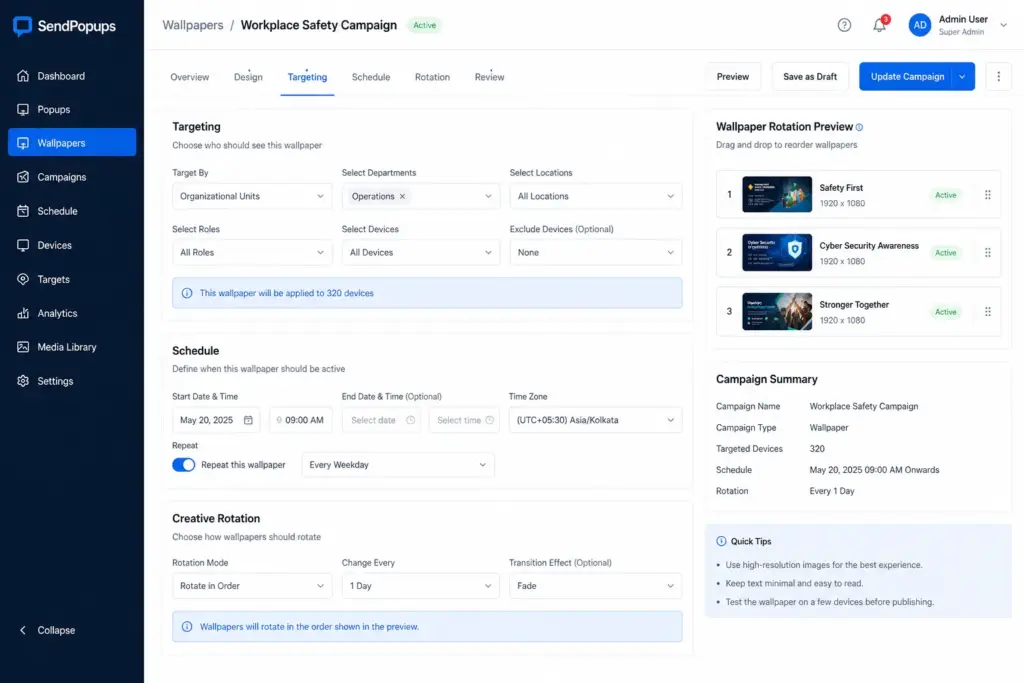
Send custom wallpapers to specific departments, individual users, selected groups, or your entire organization. Rotate different campaigns during set timeframes and schedule them for future dates without heavy IT involvement.

Dashboard Placeholder

Replace with a SendPopups admin dashboard screenshot showing wallpaper targeting, scheduling, and creative rotation settings.

Reinforce Corporate Messages

Wallpaper-based messaging helps employees see key messages at natural moments in the day. Use it to reinforce company values, goals, upcoming events, corporate news, internal awareness campaigns, or behavior reminders.

The visual nature of desktop wallpaper makes messages easier to remember while avoiding information overload.

Creative Placeholder

Replace with a values-oriented wallpaper, campaign creative, or event promotion background design.

How to Use Corporate Wallpaper to Lighten Up Internal Communications

Use wallpaper to make messages visible yet unobtrusive and explain important ideas with strong visuals.

HR Communications

Motivation and Culture

IT Communications

Emergency Communications

Corporate Wallpaper Features

This section mirrors the six core feature blocks on the reference page and adapts them for SendPopups.

Rich Content

Use images, clickable elements, slide-style content, video-inspired creatives, or HTML-like layouts with strong visual quality.

Targeting

Send different wallpaper campaigns to different departments, users, and audience combinations.

Scheduling

Time delivery and availability to match events, campaigns, deadlines, or communication strategies.

Priority Control

Keep the selected corporate wallpaper in place even if users try to change it.

PowerPoint Support

Repurpose slide-based materials for business plans, strategies, rules, regulations, and internal education.

Sequencing

Change the order of wallpaper galleries and rotate campaigns over time.

Benefits of Wallpaper for Internal Communications

What Teams Say About Visual Desktop Messaging

Swap these placeholders with real SendPopups testimonials, case studies, or proof points.

“Wallpaper gave us a subtle way to reinforce important messages without adding more disruptive communication.”

Internal Communications Lead
Enterprise organization

“It helped us keep staff aware of campaigns, reminders, and policy themes in a format they saw naturally.”

HR Manager
Multi-site business

“We liked being able to rotate visuals for different teams and communication goals from one place.”

Operations Director
Distributed workforce

Explore More Tools for Internal Communications

Pop-up Alerts

Highly visible on-screen alerts when you need employees to stop and pay attention immediately.

Video Alerts

Use richer media-based messages on employee screens.

Corporate Screensavers

Set full-screen visuals on idle PCs and update them centrally.

Mobile App

Keep employees informed even when they are away from their desks.

Frequently Asked Questions

Organizations often use corporate wallpaper to reinforce branding, create consistency, support culture, remind employees of policies, and reduce the chance of inappropriate or unmanaged desktop images.
Common options include inspirational messages, visually clean designs, role-specific reminders, cultural themes, and campaign-based backgrounds that support focus without clutter.
A clean file structure, fewer unnecessary desktop items, and consistent company-managed backgrounds all help keep desktops more organized and professional.

Need a More Subtle Way to Reinforce Internal Messages?

Use SendPopups corporate wallpaper to turn every employee desktop into a lightweight internal communication channel for culture, compliance, IT, and awareness campaigns.