










Emergency Notification Software for Business Communication
Emergency Notification Software for Fast Employee Alerts
SendPopups helps organizations send urgent internal alerts across desktop, mobile, SMS, lock screens, and signage when every second matters. Use it to reach employees during incidents, outages, evacuations, weather events, security issues, and business continuity disruptions.
Build a more reliable emergency communication workflow with fast delivery, acknowledgement tracking, prepared templates, and multi-channel reach.
- Instant multi-channel emergency messaging
- Prepared templates, panic workflows, and follow-up reporting
- Designed for visibility even when email or chat are not enough
Trust placeholder: Add your verified compliance badges, security claims, or certifications here after import.
Visual Placeholder
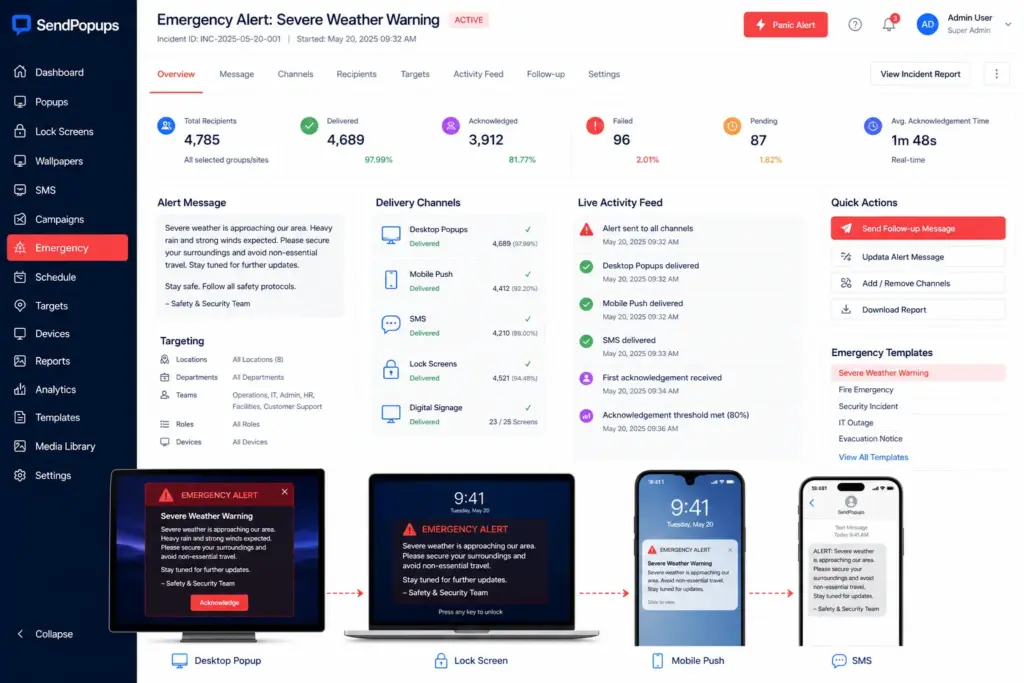
Replace this panel with a SendPopups emergency dashboard, cross-device alert visual, or incident-response mockup.
- Desktop + mobile + SMS alert flow
- Prepared emergency templates
- Acknowledgement metrics and delivery stats
- Targeting by site, team, or department
Trusted by Teams That Need Reliable Emergency Communication
Use this area for customer logos, industry badges, or trust indicators after import.
Healthcare
Critical safety communications
Education
Campus emergency visibility
Manufacturing
Plant and facility alerts
Enterprise
Cross-site crisis communication
Why Use SendPopups for Emergency Notifications?
SendPopups is designed to help organizations reach employees quickly during crises across desktop alerts, SMS, mobile push, lock screens, and other channels. It helps your message stay visible when email or chat are delayed, missed, or unavailable.
Pair fast delivery with read tracking, panic-button workflows, training support, and follow-up reporting so teams can act faster and stay informed throughout the incident lifecycle.
Image Placeholder
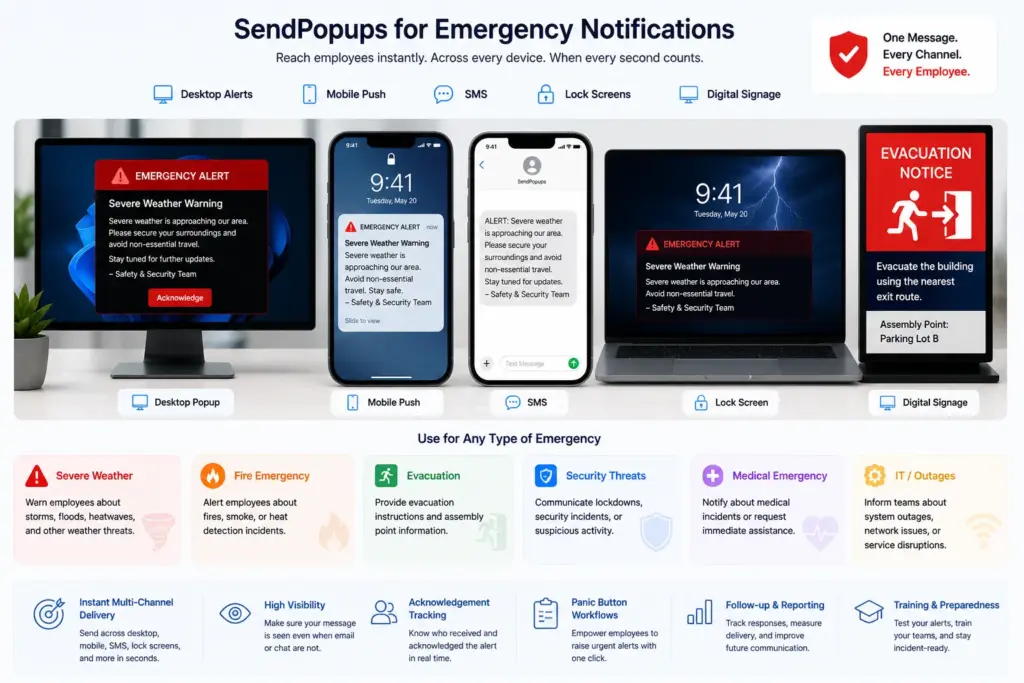
Replace with a cross-device emergency visual showing mobile, desktop, evacuation, medical, and hazard notification examples.
Reach Every Employee Instantly
When lives, safety, or operations are at risk, SendPopups helps push urgent messages across desktops, mobiles, SMS, and shared screens with speed and clarity.
Use it as an employee emergency notification system that works across departments and devices to protect people and reduce downtime.
Send Emergency Text Alerts Before, During, and After a Crisis
Don’t wait for a disaster to hit. Use SendPopups SMS and multi-channel alerts to keep employees informed before, during, and after emergencies.
For large organizations with multiple sites, crisis teams, or strict compliance needs, this page can position SendPopups as a scalable enterprise emergency communication platform.
How SendPopups Supports Your Business in a Crisis
Prepare in advance, send detailed instructions fast, get feedback, and keep staff informed across the full incident timeline.
Emergency Preparedness
- Prepare message templates in advance for likely incidents.
- Use panic shortcuts to launch alerts faster.
- Use screens, lock screens, and signage to reinforce emergency procedures.
- Review reporting after drills or tabletop exercises.
Emergency Training
- Invite staff to training sessions and track responses.
- Use desktop or mobile messages to reinforce training content.
- Support quizzes, reminders, and knowledge checks.
Send Instant Alerts
- Alert staff immediately across desktop, mobile, and signage.
- Use locked-screen visibility and full-screen notifications when needed.
- Send evacuation routes, updates, and instructions in real time.
Get Feedback
- Check whether employees are safe.
- Ask if they need immediate help.
- See who has not responded so you can follow up faster.
Keep Staff Informed
- Share post-incident updates and leadership messages.
- Give clear instructions about what to do next.
- Use different channels for morale, updates, and ongoing guidance.
Measure and Segment
- See which actions and channels worked best.
- Use response data to segment groups.
- Send follow-up information to the right employees.
See SendPopups in Action for Emergency Alerts
Use this section as a strong demo CTA with trust badges or compliance notes beneath it.
Emergency Notification Solutions for Instant Alerts Across Devices
Computers
Alert employees directly on desktops and laptops with channels built for visibility.
- Pop-up alerts
- Scrolling tickers
- Screensavers, wallpapers, and lock screens
- Email notifications
Mobiles
Reach employees wherever they are, even when they are away from corporate devices.
- Mobile app alerts
- SMS alerts
- Mobile-friendly follow-up links
Digital Signage
Use shared screens to display important information where employees gather or pass through.
- Lobby and common-area screens
- Facility-wide awareness messaging
- Reinforcement when people are away from desks
Emergency Panic Buttons for Instant Mass Alerts
- Notify large groups within seconds using panic-button workflows.
- Use pre-configured shortcuts for rapid incident response.
- Support pop-ups, full-screen notices, and scrolling tickers.
- Prepare scenario-based notifications for fires, severe weather, active threats, and more.
- Target specific locations, teams, or audience groups.
Additional Features of the SendPopups Emergency Notification System
This section adapts the reference page’s additional and key features into the SendPopups emergency-alert framework.
Lock Screen Alerts
Full-screen visibility, proactive reminders, and real-time updates when employees return to their devices.
SMS Alerts
Deliver crucial messages to mobile devices during limited internet access or for field and mobile workers.
Urgent Alerts
Your most important messages can appear despite locked screens, sleep states, or disruptive conditions.
Message Statistics
Track delivery status, timestamps, users, and connected devices for post-incident reporting.
Reading Acknowledgement
Get proof that the recipient has read and understood the message.
Recurring Messages
Automate reminders, drills, and repeat communications at configurable intervals.
Need a Stronger Emergency Use-Case Section?
Use this area for a downloadable guide, playbook, checklist, or lead magnet focused on crisis communication and emergency alert workflows.
Customer Testimonials for Emergency Communications
Replace these placeholders with real SendPopups testimonials, case studies, or verified quotes.
“We needed a reliable communication channel during emergencies when normal systems might be overloaded or inaccessible.”
Healthcare Organization
Crisis communications
“Important information that would normally be missed in email became much more visible through on-screen alerts.”
Enterprise Client
Internal communications
“We needed notifications that appeared in front of the user no matter what they were working on at the time.”
Manufacturing Organization
Operations and IT
Frequently Asked Questions
Need a More Reliable Emergency Alert Workflow?
Use SendPopups to build a multi-channel emergency communication system with faster delivery, clearer visibility, and better follow-up throughout the crisis lifecycle.