
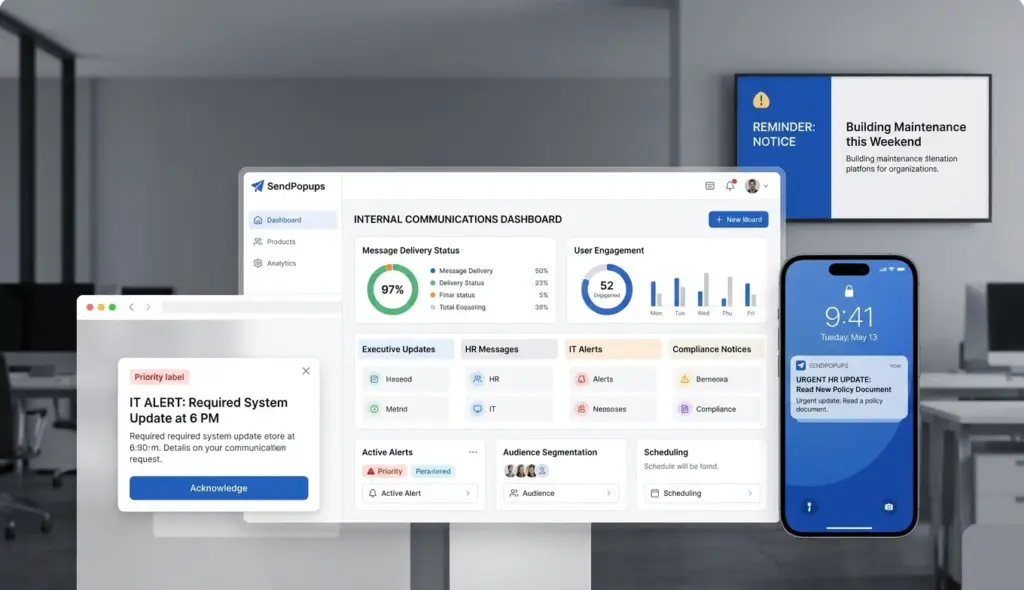












Build a high-visibility employee communication system which can cut through inbox clutter, target the right people, and deliver urgent updates across desktop, mobile, and shared screens.
Multi-channel communication across desktop, mobile, and signage
Targeted delivery by department, team, role, location, or shift
Analytics, acknowledgment, and scheduling for critical messages
How an internal communication system can make an impact
Keeping everyone informed is hard
Email, chat, and intranet posts are easy to miss when employees are busy, mobile, or overloaded with updates. Important announcements can disappear into crowded digital channels.
Reach the right employees faster
SendPopups helps teams deliver visible, targeted notifications directly to the screens and devices employees are already using, with message urgency matched to the situation.
Prove communication performance
Reporting, acknowledgment tracking, and engagement data help internal communications, HR, IT, and leadership teams see what was delivered, viewed, and acted on.
Use cases
Use SendPopups to streamline internal communications
One platform can support company news, executive messaging, operational notices, employee feedback, distributed workforce communication, and targeted internal campaigns.
Important corporate information
Push urgent updates directly to desktops and phones
Reinforce campaigns with lighter-touch formats for routine information
Keep company-wide news visible without relying on inboxes
Executive communications
Share leadership messages in a more noticeable format
Support company vision, change updates, and business priorities
Extend message visibility beyond email and meetings
Employee engagement surveys
Collect fast feedback with surveys, polls, and quick-response prompts
Target specific teams or locations for better relevance
Use results to improve communication campaigns
Remote communications
Reach remote, distributed, and traveling teams
Schedule by time zone and language where needed
Keep visibility consistent across locations
Reduce information overload
Segment messages by role, location, team, or department
Choose intrusive alerts only when urgency demands it
Let employees subscribe to relevant topics
Analyze and improve
See message reach and acknowledgment performance
Compare response patterns by channel or audience
Use communication data to refine future campaigns
Multi-channel delivery
Use more than one channel to improve visibility
Instead of relying on one communication format, show how SendPopups helps teams combine urgent alerts with softer-touch channels for broader reach and better message fit.
Desktop popups
Perfect for critical notices, outages, incidents, and any message that must cut through immediately on employee computers.
Mobile push notifications
Ideal for remote teams, traveling staff, field workers, and after-hours communication when employees are away from desks.
Tickers and banners
Use less intrusive formats for reminders, status updates, announcements, and campaign reinforcement.
Digital signage
Extend visibility into lobbies, break rooms, production areas, and shared spaces where employees may not be at a workstation.
Core capabilities
Internal communication system features
Directory sync
Keep employee data current and support targeted communication through synchronized user information.
Targeting
Deliver messages by location, team, role, group, department, or other audience attributes.
Scheduling
Prepare updates in advance and send them at the best time for each audience.
Access management
Assign permissions so the right teams can create, approve, and send the right messages.
Statistics
See what was sent, seen, acknowledged, clicked, or ignored.
Acknowledgment
Require employees to confirm critical communications when accountability matters.
Subscriptions
Let employees opt into relevant content streams to improve relevance and reduce noise.
Templates
Create reusable communication formats for HR, IT, operations, safety, or executive updates.
Branding
Keep internal communications aligned with your visual identity and message standards.
Boost internal communications
Reach more employees with the right message at the right time
Benefits of using SendPopups for internal communications
Improved employee engagement
Reach employees through channels they actually notice and make important messages harder to ignore.
Better-informed teams
Reduce communication gaps and improve awareness of company changes, incidents, priorities, and daily operations.
Less information overload
Use segmentation and channel choice to stop sending every message to everyone.
Higher message visibility
Present urgent information in a way that stands out from normal corporate noise.
More trust and transparency
Consistent, timely communication helps leadership, HR, IT, and operations build credibility with employees.
Trusted by Teams That Need Instant Alerts
IT Operations Team, SAIC
SendPopups has transformed how we communicate urgent updates across our teams. Critical alerts now reach everyone instantly, helping us respond faster during time-sensitive situations.
Communications Division, New York State Police
In emergency environments, speed and visibility are essential. SendPopups allows us to deliver immediate on-screen alerts that ensure important information reaches personnel without delay.
Campus IT Services, Vanderbilt University
SendPopups makes campus-wide communication simple and effective. Important announcements and safety alerts appear instantly across devices, ensuring students and staff stay informed.

Technology Operations, FOX
SendPopups helps us distribute urgent updates quickly across our organization. The ability to push instant popup notifications ensures critical messages are never missed.
An internal communication system is a structured set of tools and workflows used to share information within an organization. It helps leadership, HR, IT, operations, and other teams deliver messages more consistently and visibly.
Why not rely only on email?
Email is useful, but it is easy to overlook in fast-moving workplaces. A dedicated internal communication system gives teams more visible delivery options for urgent, important, or targeted updates.
Who typically uses this kind of platform?
Common users include internal communications teams, HR, IT, operations, compliance, safety, executive leadership, and local site managers.
What kinds of messages fit best?
Use cases include urgent alerts, maintenance notices, outage updates, leadership communications, policy changes, surveys, training reminders, and location-specific announcements.
How do you reduce alert fatigue?
Target only the right audiences, choose lower-disruption formats for routine updates, and reserve high-visibility alerts for messages that genuinely need immediate attention.